This theme provides comprehensive customization options for the bookmarks toolbar with enhanced transparency and auto-hide features.
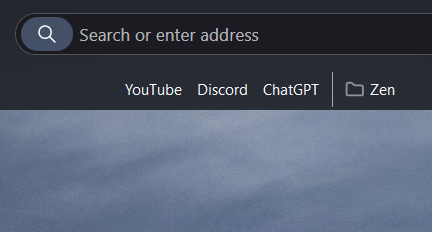
Features
Layout & Positioning
- Center the toolbar - Center bookmarks in the toolbar
- Toolbar direction - Set left-to-right or right-to-left layout
Icon & Text Management
- Hide folder icons - Remove folder icons from bookmark folders
- Hide website icons - Remove favicons from bookmark items
- Hide bookmark names - Show only icons without text labels
Transparency & Visual Effects
- Default transparent background - Bookmarks toolbar has a transparent background by default
- Enhanced transparent effects - Additional transparency effects with hover animations and styled popup menus
Auto-Hide Functionality
- Auto-hide: Expand by hovering - Hide toolbar and show on hover (only works when bookmarks toolbar is enabled)
- Auto-hide: Expand when searching - Hide toolbar and show when focusing the address bar
- Smart detection - Auto-hide features automatically disable when bookmarks toolbar is turned off
Usage
Each setting can be enabled individually through the theme's configuration panel in Zen Browser settings.
To enable the bookmarks toolbar: Press Ctrl + Shift + B (or Cmd + Shift + B on Mac)
Compatibility
- Fully compatible with Zen Browser's bookmark management
- Works with all bookmark folder structures
- Maintains functionality of bookmark drag & drop
- Preserves all native bookmark features