Private Browsing Mode Highlighting
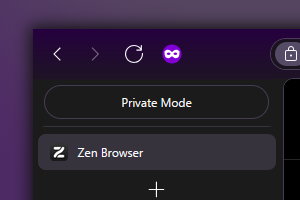
Any Zen window in private browsing mode isn't obviously indicated by default. This theme fixes that.
What this theme does.
By default, this theme:
- Highlights the toolbar of a private browsing window with a purple gradient.
- Adds a purple border surrounding the page.
- Adds a private browsing icon to the right of the refresh button.
It also comes with the following settings:
- Replace the gradient with a solid purple color.
- Remove the background color entirely.
- Remove the purple border that surrounds the page.
- Changes the purple highlight color to either match Zen's theme color, or a custom color of your choice.
- Hide the private browsing icon.
These settings can be found in Zen's browser settings, in the 'Zen Mods' tab.
Encountered an issue? Raise them here.